You may have already confirmed the product, packaging structure and quotation. 그 다음에, just when the project seems ready to move forward, the supplier asks one more question:
“Can you send us the print-ready artwork?”
This is where many custom packaging projects suddenly slow down.
Correct 맞춤 포장 삽화 파일 help prevent missing fonts, blurry logos, incorrect colors, misplaced hot stamping, outdated dielines and unnecessary sample revisions. 더 중요한 것은, good artwork allows the packaging supplier to understand exactly how your box or tube should be printed and finished.
그래서, before you send that final AI or PDF file, it is worth checking whether the artwork is actually ready for production—not simply whether it looks good on your screen.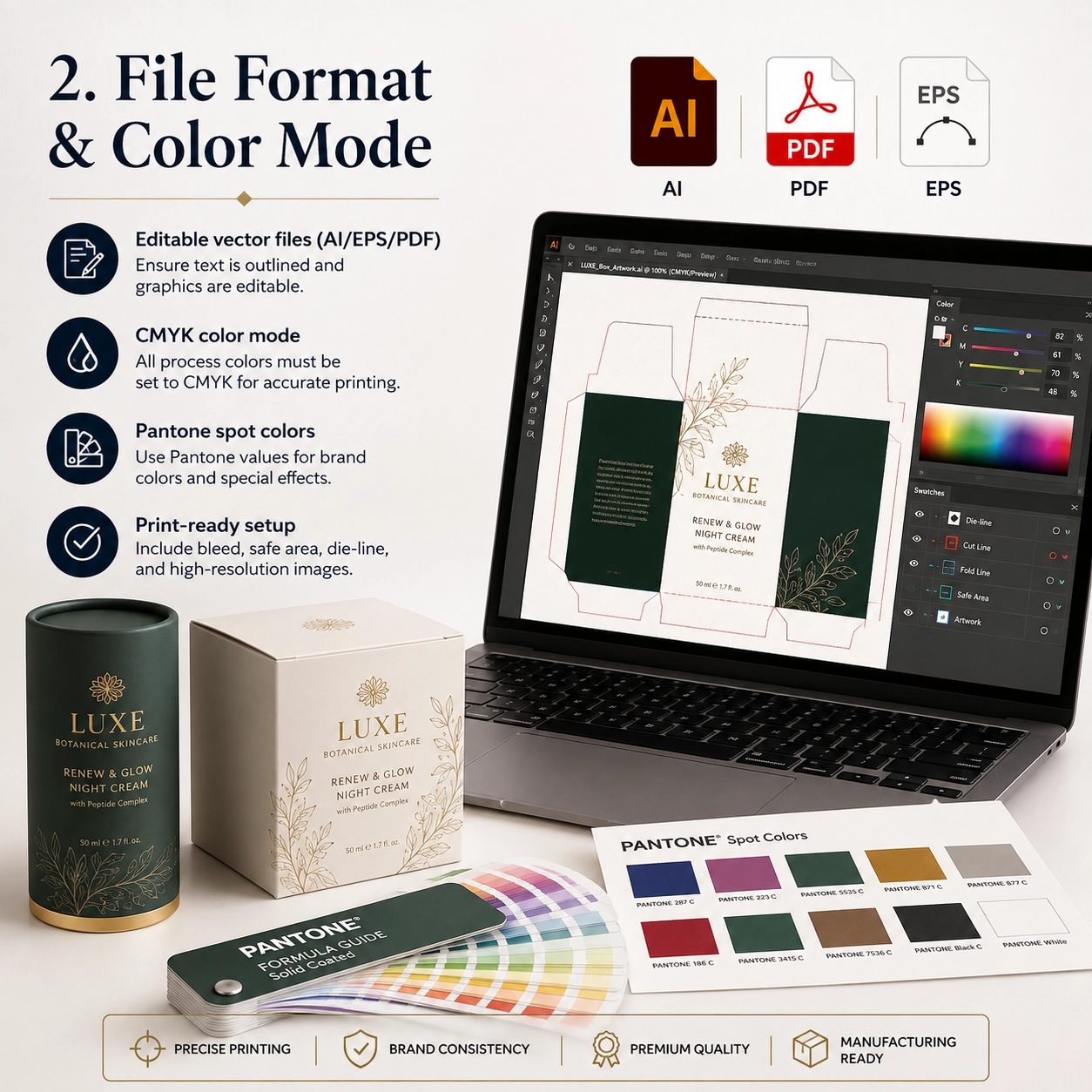
이 포장 유형은 무엇입니까??
In this article, we are not talking about one particular box or paper tube. 대신에, we are talking about the technical artwork required to manufacture custom paper packaging.
Custom packaging artwork files are production files built on the approved packaging dieline.
Unlike a JPG mockup, they tell the factory where to:
- Cut
- Fold
- Glue
- Apply foil
- 엠보싱
- 데보스
- Apply spot UV
- Create a window
- Position regulatory text
다시 말해서, the mockup explains the visual idea, while the technical artwork explains how that idea becomes a physical package.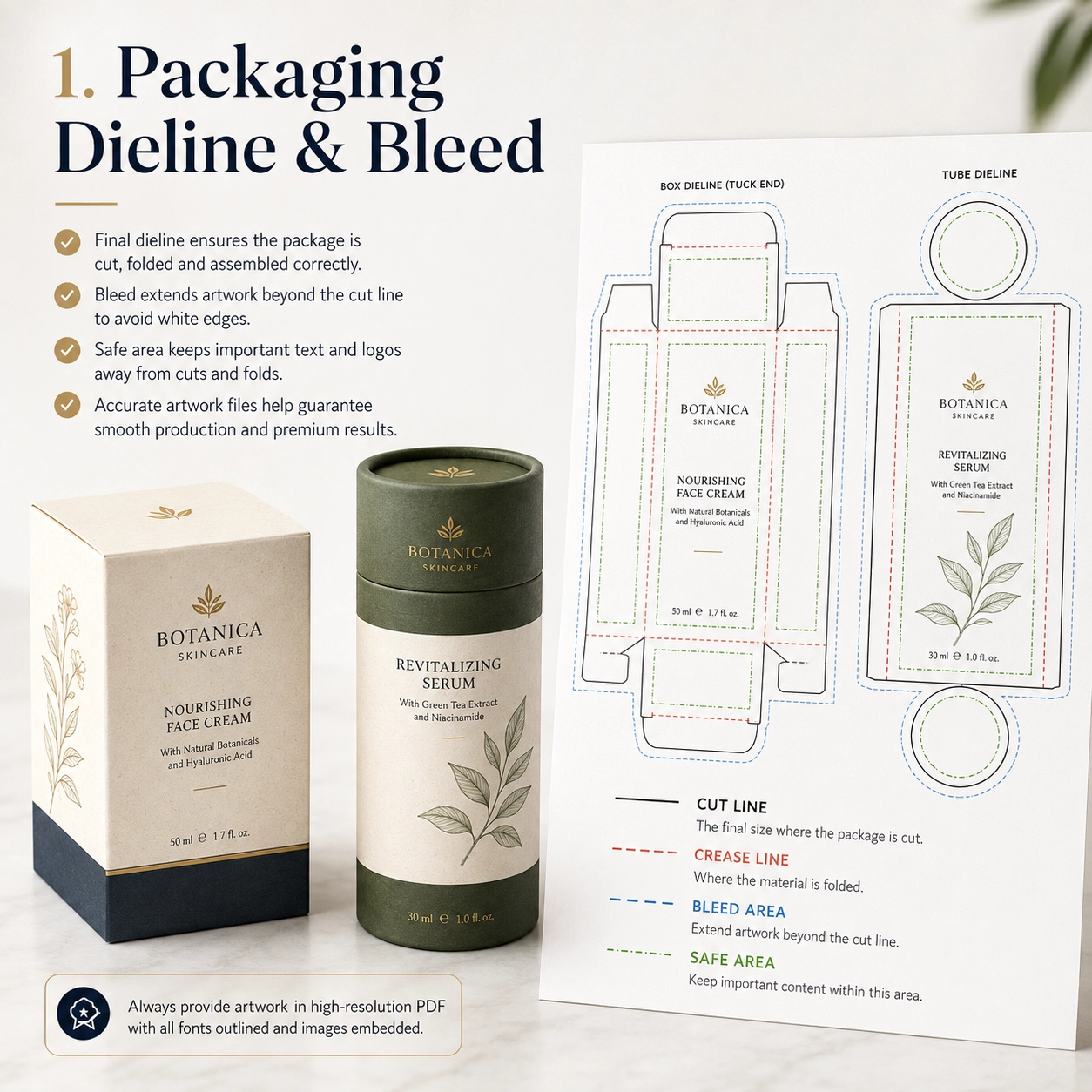
Common Artwork Components
A packaging production file may contain:
- Dieline
- Cut line
- Crease line
- Glue area
- 출혈
- Safe area
- CMYK 아트웍
- 팬톤 컬러
- Product text
- 바코드
- Hot-stamping layer
- Embossing layer
- Debossing layer
- Spot UV layer
- Window line
- Insert artwork
그러므로, the final artwork should always be created around the approved production structure rather than an estimated size.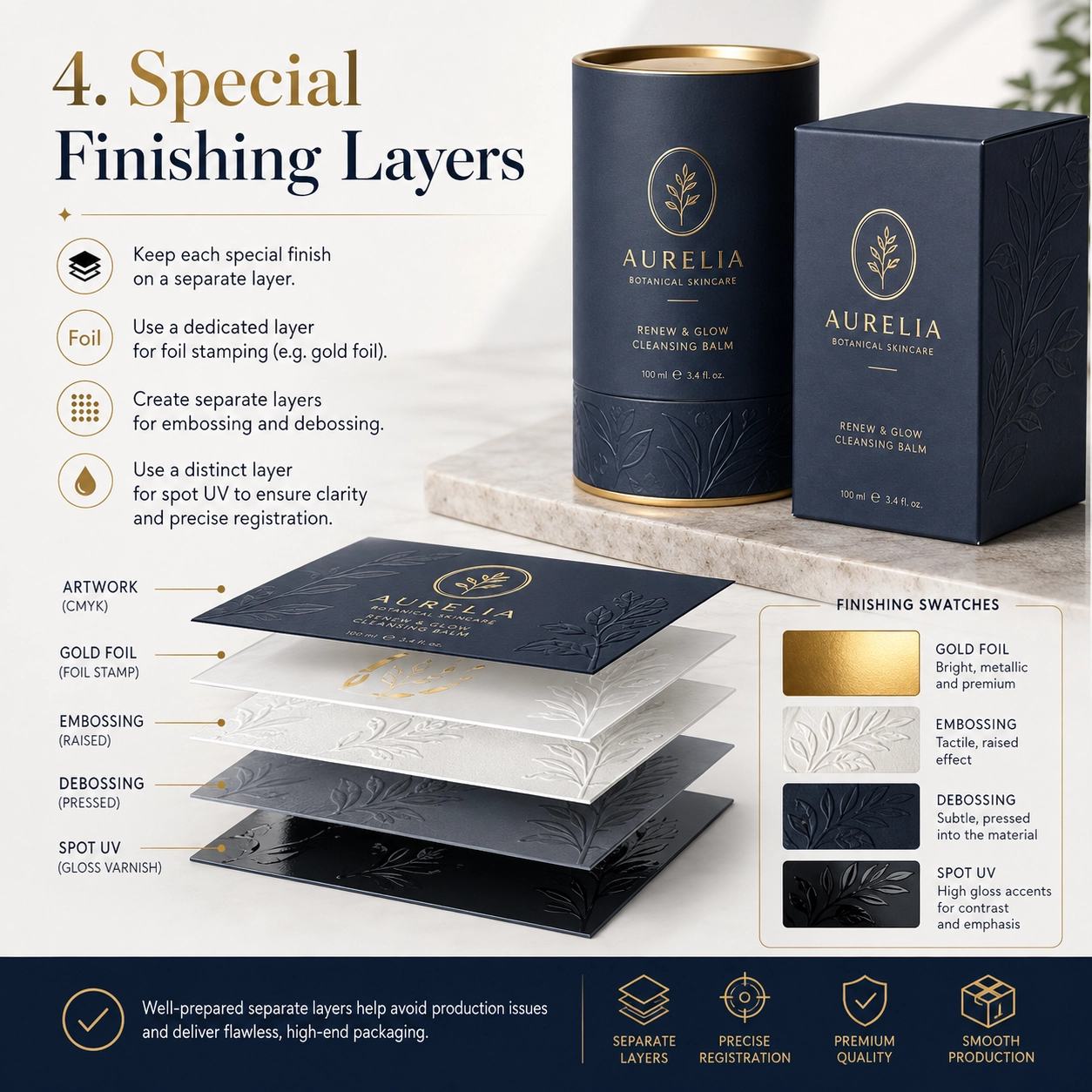
Preferred Artwork Formats
For many packaging projects, editable formats such as these are practical:
- 일체 포함
- 편집 가능한 PDF
- EPS
그 동안에, high-resolution PSD or TIFF files may be used for photographs or raster artwork.
Vector graphics are especially useful for logos, 텍스트, dielines and finishing areas because Illustrator vector artwork can be scaled for print without the pixelation associated with low-resolution raster graphics.
Why JPG or PNG Is Usually Not Enough
A JPG may show the design clearly. 하지만, it normally does not contain editable:
- Dielines
- Spot colors
- Foil paths
- Embossing paths
- Cutting paths
- Separate finishing layers
그러므로, a JPG is better treated as a visual reference rather than the only production file.
If you only have a JPG, tell the packaging supplier early. The design or prepress team can then determine whether the artwork needs to be rebuilt.
일반적인 응용
The preparation of 맞춤 포장 삽화 파일 varies according to the product category.
향수 포장
Perfume packaging often looks visually simple but may involve several premium finishing processes.
예를 들어, a rigid perfume box or paper tube may require separate layers for:
- Dark green Pantone printing
- 금박 로고
- Embossed brand mark
- 무광택 라미네이션
- Insert branding
If the gold logo must also be embossed, the supplier needs to know whether the embossing follows exactly the same shape.
그러므로, separate the layers clearly.
A practical Illustrator layer structure could look like:
- DIELINE
- CMYK PRINT
- PANTONE
- GOLD FOIL
- EMBOSS
- SPOT UV
- INSERT
This makes communication much easier.
스킨케어 및 화장품
Cosmetic packaging often contains more written information than perfume packaging.
Typical content may include:
- 제품명
- 재료
- 지도
- Net contents
- 경고
- Manufacturer details
- 바코드
- Batch information
따라서, typography and safe areas become especially important.
Before sending the artwork, check whether small text is too close to:
- Fold lines
- Cutting edges
- 윈도우
- Glue flaps
- Tube seams
차와 커피
Tea and coffee packaging frequently combines branding with detailed product information.
여기에는 다음이 포함될 수 있습니다.:
- Country of origin
- Flavor notes
- 양조 지침
- 재료
- 순중량
- 바코드
If the artwork is printed on natural kraft paper, keep in mind that the brown paper base will affect how colors appear.
그러므로, do not assume that a color shown on a white monitor will reproduce identically on kraft paper.
초콜릿과 사탕
Chocolate and confectionery packaging often combines:
- CMYK illustrations
- 사진술
- 금박
- 윈도우
- 제품정보
A window introduces an additional technical area.
그러므로, the artwork should clearly show the window die-cut line while keeping text and important graphics outside the required production tolerance.
양초 포장
Candle packaging often uses simpler, more premium artwork.
A typical design might combine:
- Dark background
- Brand logo
- Scent name
- Botanical illustration
- 금박
- 제품 무게
하지만, dark surfaces can make small printing or finishing inconsistencies more visible.
그러므로, physical sampling is especially valuable for premium candle packaging.
선물 포장
Gift packaging gives designers more creative freedom.
하지만, structures such as drawer boxes, magnetic boxes and telescopic packaging have several visible surfaces.
따라서, the designer should consider the entire unboxing sequence rather than designing only the front panel.
재료 옵션
The paper selected for production affects how 맞춤 포장 삽화 파일 will reproduce in real life.
크래프트 종이
Natural kraft paper has a brown base tone.
그러므로, bright colors may appear more muted compared with printing on white coated paper.
Suitable design directions include:
- 검정색 인쇄
- 암록색
- Brown
- White ink where supported
- 동박
- Matte gold foil
사실은, the natural material itself can become part of the artwork.
아트지
Coated art paper provides a smooth surface for:
- CMYK 인쇄
- 팬톤
- 사진술
- 정교한 타이포그래피
- 그라데이션
- 상세한 일러스트레이션
Afterward, it can receive:
- 무광택 라미네이션
- 광택 라미네이션
- 소프트 터치 라미네이션
- 긁힘 방지 라미네이션
특수지
Specialty papers may include:
- Linen texture
- Leather texture
- 금속 종이
- 진주빛 종이
- 염색된 종이
- Embossed texture
하지만, deeply textured surfaces can reduce the visual clarity of very fine details.
그러므로, extremely thin logo lines or small foil details may need to be simplified before production.
Food-Grade Paper
Food packaging may require approved food-contact materials or internal barrier components.
하지만, these technical materials are generally specified separately from the outer decorative artwork.
예를 들어, the external design may be printed on art paper, while the inside uses:
- 식품등급 종이
- PE 코팅지
- 기름 방지 종이
- 호일 라이너
- 내부 파우치
Foil Liner
차, 커피, nuts and snack tubes may use an aluminum foil or multilayer liner.
대개, the exterior artwork file still controls only the outer branding.
하지만, if an internal component also requires printing, provide separate artwork and clearly identify the part.
구조 옵션
Packaging structure should be finalized before the designer completes 맞춤 포장 삽화 파일.
그렇지 않으면, a structural change may force the artwork to be redesigned.
Paper Lid Tube
A standard paper tube normally contains:
- Main body
- Lid
- 맨 아래
- Seam area
Avoid placing the main logo directly over the vertical seam.
대신에, define the primary viewing area.
어깨-목 튜브
A shoulder-neck tube contains an inner neck that becomes visible after the lid is removed.
This creates another branding opportunity.
예를 들어:
- Dark green exterior
- Gold inner neck
- Cream interior
하지만, all visible components should be included in the approved material and production specification.
텔레스코픽 구조
A telescopic tube may use:
- Long upper lid
- Short lower base
- Inner insert
그러므로, the designer should confirm:
- Upper-section height
- Lower-section height
- Overlap
- Front orientation
Do not guess these dimensions.
창 포장
Window artwork must use the approved die-cut position.
The design should consider:
- Window shape
- 창 크기
- Film area
- Product position
- Safe area
게다가, the real product should remain aligned behind the window.
Paper Tube With Insert
An insert may use:
- 에바
- EPE
- 판지
- 성형펄프
- 플라스틱 트레이
If the insert includes printed paper or a branded card, provide a separate artwork file.
푸쉬업 튜브
Push-up paper tubes contain moving internal components.
그러므로, critical graphics should stay away from areas where movement or seams may affect visibility.
트위스트 업 튜브
Twist-up packaging requires precise dimensions.
이러한 이유로, the final dieline should be approved before artwork production begins.
Sleeve Packaging
Sleeves can be very useful for multiple SKUs.
예를 들어, one base package may be used for five different products while each product receives a different sleeve.
결과적으로, brands can reduce structural complexity while maintaining product differentiation.
인쇄 & 마무리 옵션
이곳은 맞춤 포장 삽화 파일 become especially important.
Different printing and finishing processes should not be merged into one unidentified artwork layer.
CMYK 인쇄
CMYK is commonly used for process printing involving:
- 사진술
- 그라데이션
- 일러스트레이션
- Multicolor graphics
Adobe’s Illustrator print documentation instructs users to switch RGB documents to CMYK mode when preparing color separations for process printing.
하지만, printed color can still be influenced by the paper, 잉크, coating and finishing.
그러므로, do not approve critical brand colors solely from a phone or monitor.
팬톤 / Spot Colors
Spot colors are useful when a brand requires a particular signature shade.
예를 들어:
- Brand green
- Burgundy
- Navy
- Orange
Clearly identify the required Pantone or spot color in the artwork.
Do not simply write:
“Please match this green.”
게다가, request a physical proof when strict color matching is commercially important.
핫 스탬핑
Hot stamping should normally be provided as a separate vector layer.
예를 들어:
GOLD FOIL
Do not create a gold gradient in Photoshop and assume that it communicates metallic foil production.
대신에, provide a clean vector shape showing exactly where the foil should be applied.
엠보싱
Embossing raises the surface.
그러므로, provide a separate vector layer showing the exact embossed area.
A simple label could be:
EMBOSS
If foil and embossing must register together, make that clear in both the artwork and production instructions.
디보싱
Debossing creates a recessed surface.
Like embossing, it should be supplied as a separate, clearly labeled vector area.
스팟 UV
Spot UV creates glossy contrast over selected areas.
그러므로, create a separate layer called:
SPOT UV
Do not merge the effect into the CMYK artwork.
무광택 라미네이션
Full matte lamination normally applies across the entire printed surface.
그러므로, it usually does not need its own artwork layer.
대신에, specify the film in the finishing requirements.
광택 라미네이션
Gloss lamination follows the same principle.
하지만, if only one logo or pattern needs gloss, the process may actually be spot UV rather than full gloss lamination.
How to Prepare Custom Packaging Artwork Files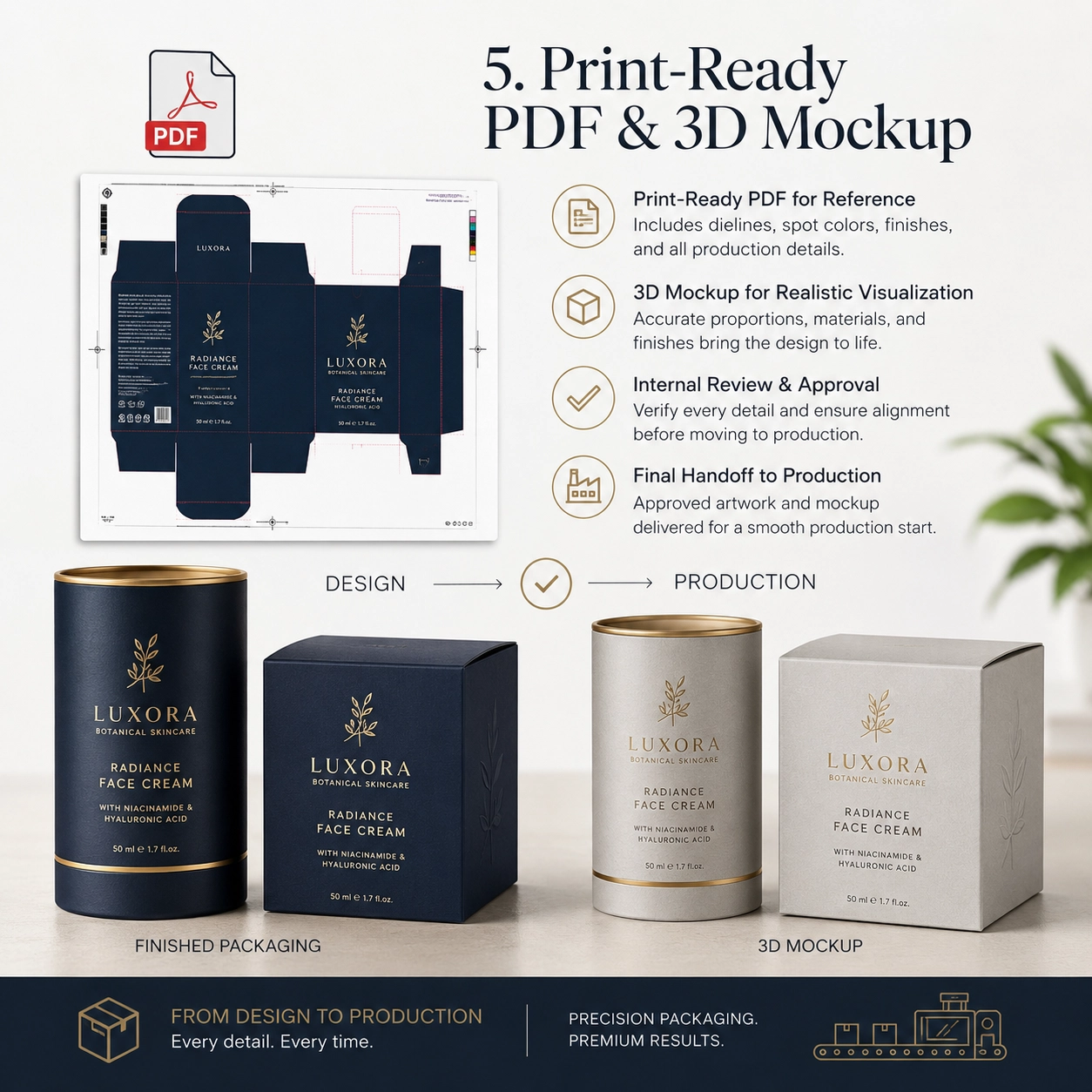

Before sending 맞춤 포장 삽화 파일 to the factory, go through the following workflow.
단계 1: Use the Final Approved Dieline
Never design final production artwork on an early structural drawing.
If the package dimensions change, request a new dieline.
단계 2: Keep the Dieline at Actual Size
Do not resize or stretch the dieline.
A production dieline should represent the actual package dimensions.
단계 3: Add Bleed
If background colors, photographs or illustrations reach the trim edge, extend them beyond the final trim line.
Illustrator supports document bleed and printer marks through its Marks & Bleed controls.
Many commercial projects use approximately 3 mm, but the packaging supplier’s specification should always take priority.
단계 4: Respect the Safe Area
Keep important elements away from trim and fold tolerances.
These elements include:
- 심벌 마크
- 바코드
- 제품명
- 재료
- Small text
단계 5: Prepare the Correct Print Color Mode
For process printing, prepare the file using the agreed CMYK workflow.
If Pantone colors are required, identify them separately.
단계 6: Check Fonts
Missing fonts can change text layout.
그러므로, either outline the fonts where appropriate or package the required font resources according to the agreed workflow.
Adobe Illustrator’s Package command can collect the Illustrator file together with linked graphics and eligible font resources for handoff.
Always keep an editable master version before converting text into outlines.
단계 7: Check Linked Images
One of the most common handoff problems is missing linked images.
Illustrator’s Links panel shows placed linked and embedded files, while the Package function can gather linked assets for transfer.
Before sending the project, check that every required image is included.
단계 8: Keep Logos Vector Where Possible
Vector logos produce cleaner results for:
- 인쇄
- 핫 스탬핑
- 엠보싱
- Scaling
Avoid extracting a small logo from a website screenshot.
단계 9: Separate Special Finishing Layers
A good file structure could be:
- DIELINE
- CMYK
- PANTONE
- GOLD FOIL
- EMBOSS
- DEBOSS
- SPOT UV
- WINDOW
This makes the intended manufacturing processes obvious.
단계 10: Check Overprint
Overprint settings can change how overlapping objects reproduce.
Illustrator includes dedicated overprint and color-separation controls, so these settings should be reviewed during prepress when relevant.
단계 11: Export a Print-Ready PDF
Along with the editable file, export a high-quality PDF reference.
Illustrator supports PDF creation for print workflows, including PDF/X-related options.
The supplier can use the PDF to compare the intended layout against the editable artwork.
단계 12: Include a 3D Mockup
A 3D rendering is not the technical production file.
그럼에도 불구하고, it is very useful because it shows:
- Front orientation
- Opening direction
- 로고 위치
- Expected finished appearance
다시 말해서:
Artwork tells the factory how to produce it.
Mockups tell the factory how you expect it to look.
Providing both reduces ambiguity.
Packaging Artwork Preflight Checklist
Before sending your file, 확인하다:
- Correct dieline
- Correct packaging size
- Bleed included
- Safe zone checked
- CMYK workflow confirmed
- Pantone colors identified
- Fonts supplied correctly
- Linked images included
- Logos are vector
- Image quality checked
- Barcode checked
- Text proofread
- Foil layer separated
- Embossing layer separated
- Debossing layer separated
- Spot UV layer separated
- Window position confirmed
- Dieline kept separate
- PDF exported
- Mockup supplied
- Final internal approval completed
Acrobat Pro’s Preflight tools are specifically designed to analyze PDFs for print-production problems before output.
How Artwork Affects Sampling and Production Time
Poorly prepared 맞춤 포장 삽화 파일 can delay a packaging project before manufacturing even starts.
예를 들어:
The supplier receives a JPG.
Then the editable artwork is requested.
다음, the AI file arrives but linked images are missing.
이후, the correct images are supplied.
하지만, the dieline is outdated.
Once the dieline is corrected, the designer discovers that the foil layer has not been separated.
Another revision is required.
At this point, several days may have passed—even though no mass-production machine has started.
그러므로, good artwork preparation can directly improve the efficiency of the packaging development process.
Planning Your Packaging Lead Time?
Artwork approval is only one part of the overall project.
If you are also planning sampling, production and delivery, 우리의 글을 읽어보세요 Custom Paper Tube Production Time: Complete Lead Time Guide.
That guide explains how:
- 작품 승인
- 견본 추출
- MOQ
- 자재 가용성
- 인서트
- Special finishing
- Multiple SKUs
can influence the complete production schedule.
함께, these articles answer two important purchasing questions:
Is my artwork ready for printing?
그리고
How long will production take after it is approved?
Common Artwork Mistakes
Sending Only a Screenshot
A screenshot may show the design direction, but it usually cannot provide the editable technical information required for production.
그러므로, supply editable artwork whenever possible.
Designing Before the Structure Is Final
If the dieline changes, artwork positions also change.
따라서, finalize the packaging structure first.
Missing Linked Files
Check all linked photographs and graphics before sending the project.
Low-Resolution Logos
A logo copied from a website may look acceptable on a monitor but reproduce poorly in print.
대신에, ask for the original vector version.
Using Too Many Unidentified Layers
Clear layer names reduce communication problems.
예를 들어:
Layer 17 Copy 2
is much less useful than:
GOLD FOIL.
Merging Foil Into CMYK
The printer needs to know what should be printed and what should be foil stamped.
그러므로, keep those processes separate.
Ignoring the Tube Seam
For cylindrical packaging, avoid placing important branding on the spiral or vertical outer-wrap seam whenever the structure makes that area visually sensitive.
Designing on Hidden Areas
Some artwork can disappear beneath:
- 뚜껑이 겹쳐짐
- Glue flaps
- Inner folds
- 소매
그러므로, check the assembled package before approving the design.
규정 준수 & 지속 가능성
Packaging artwork can also contain regulatory or compliance information.
Depending on the product and market, this may include:
- 제품명
- 재료
- Net contents
- 경고
- Manufacturer information
- Batch area
- 바코드
- Recycling information
The brand, importer or responsible party should confirm the exact regulatory requirements for the destination market.
FSC
If an FSC trademark is used, its use should comply with the applicable certification and trademark-approval requirements.
그러므로, do not simply download an FSC logo and place it on packaging without confirming authorization.
식품 접촉
Food-contact safety depends on the approved packaging materials and full construction, not simply the exterior graphics.
응용 프로그램에 따라, 구매자가 요청할 수 있습니다:
- Food-contact reports
- 마이그레이션 보고서
- 물질 선언
- Ink information
- Adhesive information
BRC와 IFS
BRCGS Packaging Materials and relevant IFS systems may support supplier-quality or food-packaging requirements.
하지만, certification references and logos should only be used appropriately.
EUDR과 EPR
For applicable markets and supply chains, packaging buyers may also need to consider material due diligence and producer-responsibility requirements.
그러므로, regulatory review should happen before the final artwork is locked whenever these requirements affect printed information.
Sustainable Artwork Choices
Luxury packaging does not automatically require the maximum number of finishing processes.
예를 들어, good typography combined with textured paper and one small foil logo may create a stronger premium effect than:
- Full lamination
- Large foil areas
- Several metallic colors
- Multiple UV coatings
그러므로, good design can sometimes reduce production complexity as well as material use.
사용자 정의 방법
A smooth 맞춤 포장 삽화 파일 workflow starts before the designer opens Illustrator.
단계 1: Send Product Information
제공하다:
- 제품명
- 제품 크기
- 제품 무게
- 사진
- Physical sample if possible
단계 2: Choose the Packaging Structure
Select:
- Paper tube
- Rigid box
- Folding carton
- Drawer box
- Sleeve box
- 창 포장
- Telescopic packaging
단계 3: Confirm the Size
Approve final dimensions.
Do not finalize the artwork before this step.
단계 4: 재료를 선택하세요
Select:
- 크라프트지
- 아트지
- 특수지
- Food-grade material
- 호일 라이너
단계 5: 삽입 확인
옵션에는 다음이 포함될 수 있습니다.:
- 삽입 없음
- 판지
- 에바
- EPE
- 성형펄프
- 플라스틱 트레이
단계 6: Confirm Printing
선택하다:
- CMYK
- 팬톤
- 단색 인쇄
- Combination printing
단계 7: Select Finishing
Possible choices include:
- 핫 스탬핑
- 엠보싱
- 디보싱
- 스팟 UV
- 무광택 라미네이션
- 광택 라미네이션
- 소프트 터치 라미네이션
- 긁힘 방지 라미네이션
단계 8: Request the Final Dieline
Once the structure and size are approved, request the final production dieline.
단계 9: 작품 준비
Supply:
- 일체 포함
- 편집 가능한 PDF
- EPS where appropriate
Also provide a PDF reference and, 이상적으로는, a 3D mockup.
단계 10: MOQ 확인
Provide realistic quantities.
예를 들어:
- 500 PC
- 1,000 PC
- 3,000 PC
- 5,000 PC
- 10,000 PC
단계 11: 리드타임 확인
Share the required:
- Launch date
- Factory completion date
- Delivery date
- 목적지
단계 12: 샘플 승인
마지막으로, 확인하다:
- 크기
- 구조
- 색상
- 삽화
- 박
- 엠보싱
- 삽입 맞춤
- Product positioning
Once these points are approved, mass production can proceed more efficiently.
관련 제품: 맞춤형 종이 튜브 / 식품 포장 / 화장품 포장
팩 포장을 선택하는 이유?
Pack Packaging supports custom paper tubes and paper boxes from structural development through mass production.
우리의 제조 시설은 다음과 같습니다 20,000㎡, 포함 2,000㎡ 식품 등급 워크샵. 게다가, 월간 종이 튜브 생산 능력 초과 10,000,000 조각들.
우리의 20+ 멤버 디자인팀 도움을 줄 수 있다:
- Dieline development
- Product fitting
- Artwork checking
- 재료 선택
- 인서트 디자인
- CMYK 인쇄
- 팬톤 인쇄
- 핫 스탬핑
- 엠보싱
- 스팟 UV
- 견본 추출
- Production preparation
When customers send 맞춤 포장 삽화 파일, our team reviews the graphic layout together with the actual structure rather than treating the design as an isolated image.
Our OEM and ODM capabilities include:
- 맞춤 크기
- 종이 튜브
- 단단한 상자
- 접는 상자
- Drawer boxes
- 슬리브 박스
- 크라프트지
- 아트지
- 특수지
- Food-grade materials
- 판지 삽입물
- EVA 인서트
- EPE 인서트
- 성형 펄프 인서트
- CMYK
- 팬톤
- 핫 스탬핑
- 엠보싱
- 디보싱
- 스팟 UV
- 무광택 라미네이션
- 광택 라미네이션
- 소프트 터치 라미네이션
- 긁힘 방지 라미네이션
- 구조 샘플
- 인쇄된 샘플
- 품질검사
- 수출 포장
Depending on the final materials, 제품 적용 및 대상 시장, supporting documentation may include FSC-related documentation, 식품 접촉 보고서, BRC-related information, IFS-related information, RoHS 규제 2.0, REACH-SVHC and EPR support.
The exact documentation should always be confirmed against the final approved specification.
자주 묻는 질문
1. What file format should I send for packaging printing?
편집 가능한 AI, PDF or EPS files are commonly useful for packaging production. A PDF reference and 3D mockup can also make the intended finished appearance clearer.
2. Should packaging artwork be CMYK or RGB?
For standard process printing, artwork is typically prepared in a CMYK print workflow. Illustrator provides CMYK document mode and separation controls specifically for print output.
3. Do I need bleed?
If artwork reaches the trim edge, bleed is generally required. Illustrator supports defined bleed areas and bleed marks, while the exact amount should follow the packaging manufacturer’s specification.
4. Do fonts need to be outlined?
Fonts can be outlined where appropriate or supplied through an agreed packaged workflow. Always keep an editable master file because outlined text is no longer normal editable type.
5. Do foil, embossing and spot UV need separate layers?
예. Clearly separated vector layers make it much easier for the prepress and production teams to identify each special process.
6. Can I send a Canva, JPG or PNG file?
You can use them as references. 하지만, the packaging supplier may still require editable production artwork containing dielines, vector logos and special-finishing information.
7. Why does the printed color look different from my monitor?
Screen display and physical printing use different output processes, while paper, 잉크, coatings and lighting can also influence the final appearance.
그러므로, physical approval is recommended when exact brand color matters.
8. Can you help check my artwork before printing?
예. The design and prepress team can review the artwork against the approved structure and identify potential production issues before sampling.
더 많은 맞춤형 포장 솔루션 살펴보기
더 많은 포장 옵션을 찾고 있습니다.? 다양한 산업 및 응용 분야에 맞게 설계된 맞춤형 포장 제품 전체를 살펴보세요..
접이식 상자 – 소매 포장을 위한 가볍고 완전히 맞춤화 가능한 상자.
단단한 상자 – 명품 브랜드를 위한 프리미엄 견고한 선물 상자.
골판지 상자 – 내구성 있는 배송 및 전자상거래 포장 솔루션.
어린이 방지 상자 – 규제 대상 제품의 안전한 포장.
부속품 – 맞춤형 인서트, 티슈 페이퍼, 고삐, 라벨, 그리고 더.
종이 튜브 – 차를 위한 맞춤형 종이 튜브 포장 전용 컬렉션을 살펴보세요., 커피, 화장품, 양초, 주정, 및 기타 프리미엄 제품을 전문 홈페이지에서 만나보실 수 있습니다..
맞춤형 포장이 필요합니다? 무료 견적과 전문가 상담을 받으려면 지금 저희 팀에 문의하세요..