Zum Inhalt springen
You may have already confirmed the product, packaging structure and quotation. Dann, just when the project seems ready to move forward, the supplier asks one more question:
“Can you send us the print-ready artwork?”
This is where many custom packaging projects suddenly slow down.
Correct benutzerdefinierte Verpackungsgrafikdateien help prevent missing fonts, blurry logos, incorrect colors, misplaced hot stamping, outdated dielines and unnecessary sample revisions. Noch wichtiger, good artwork allows the packaging supplier to understand exactly how your box or tube should be printed and finished.
Also, before you send that final AI or PDF file, it is worth checking whether the artwork is actually ready for production—not simply whether it looks good on your screen.
Was ist dieser Verpackungstyp??
In this article, we are not talking about one particular box or paper tube. Stattdessen, we are talking about the technical artwork required to manufacture custom paper packaging.
Custom packaging artwork files are production files built on the approved packaging dieline.
Unlike a JPG mockup, they tell the factory where to:
- Cut
- Fold
- Glue
- Apply foil
- Emboss
- Deboss
- Apply spot UV
- Create a window
- Position regulatory text
Mit anderen Worten, the mockup explains the visual idea, while the technical artwork explains how that idea becomes a physical package.
Common Artwork Components
A packaging production file may contain:
- Dieline
- Cut line
- Crease line
- Glue area
- Bleed
- Safe area
- CMYK artwork
- Pantone-Farben
- Product text
- Barcode
- Hot-stamping layer
- Embossing layer
- Debossing layer
- Spot UV layer
- Window line
- Insert artwork
daher, the final artwork should always be created around the approved production structure rather than an estimated size.
Preferred Artwork Formats
For many packaging projects, editable formats such as these are practical:
- KI
- Bearbeitbares PDF
- EPS
In der Zwischenzeit, high-resolution PSD or TIFF files may be used for photographs or raster artwork.
Vector graphics are especially useful for logos, Text, dielines and finishing areas because Illustrator vector artwork can be scaled for print without the pixelation associated with low-resolution raster graphics.
Why JPG or PNG Is Usually Not Enough
A JPG may show the design clearly. Jedoch, it normally does not contain editable:
- Dielines
- Spot colors
- Foil paths
- Embossing paths
- Cutting paths
- Separate finishing layers
daher, a JPG is better treated as a visual reference rather than the only production file.
If you only have a JPG, tell the packaging supplier early. The design or prepress team can then determine whether the artwork needs to be rebuilt.
Allgemeine Anwendungen
The preparation of benutzerdefinierte Verpackungsgrafikdateien varies according to the product category.
Parfümverpackung
Perfume packaging often looks visually simple but may involve several premium finishing processes.
Zum Beispiel, a rigid perfume box or paper tube may require separate layers for:
- Dark green Pantone printing
- Logo aus Goldfolie
- Embossed brand mark
- Matte Laminierung
- Insert branding
If the gold logo must also be embossed, the supplier needs to know whether the embossing follows exactly the same shape.
daher, separate the layers clearly.
A practical Illustrator layer structure could look like:
- DIELINE
- CMYK PRINT
- PANTONE
- GOLD FOIL
- EMBOSS
- SPOT UV
- INSERT
This makes communication much easier.
Hautpflege und Kosmetik
Cosmetic packaging often contains more written information than perfume packaging.
Typical content may include:
- Produktname
- Zutaten
- Wegbeschreibung
- Net contents
- Warnings
- Manufacturer details
- Barcode
- Batch information
Folglich, typography and safe areas become especially important.
Before sending the artwork, check whether small text is too close to:
- Fold lines
- Cutting edges
- Windows
- Glue flaps
- Tube seams
Tee und Kaffee
Tea and coffee packaging frequently combines branding with detailed product information.
This may include:
- Country of origin
- Flavor notes
- Brauanleitung
- Zutaten
- Nettogewicht
- Barcode
If the artwork is printed on natural kraft paper, keep in mind that the brown paper base will affect how colors appear.
daher, do not assume that a color shown on a white monitor will reproduce identically on kraft paper.
Chocolate and Candy
Chocolate and confectionery packaging often combines:
- CMYK illustrations
- Fotografie
- Goldfolie
- Windows
- Produktinformationen
A window introduces an additional technical area.
daher, the artwork should clearly show the window die-cut line while keeping text and important graphics outside the required production tolerance.
Kerzenverpackung
Candle packaging often uses simpler, more premium artwork.
A typical design might combine:
- Dark background
- Brand logo
- Scent name
- Botanical illustration
- Goldfolie
- Produktgewicht
Jedoch, dark surfaces can make small printing or finishing inconsistencies more visible.
daher, physical sampling is especially valuable for premium candle packaging.
Geschenkverpackung
Gift packaging gives designers more creative freedom.
Jedoch, structures such as drawer boxes, magnetic boxes and telescopic packaging have several visible surfaces.
Folglich, the designer should consider the entire unboxing sequence rather than designing only the front panel.
Materialoptionen
The paper selected for production affects how benutzerdefinierte Verpackungsgrafikdateien will reproduce in real life.
Kraftpapier
Natural kraft paper has a brown base tone.
daher, bright colors may appear more muted compared with printing on white coated paper.
Suitable design directions include:
- Schwarzer Druck
- Dunkelgrün
- Brown
- White ink where supported
- Kupferfolie
- Matte gold foil
Tatsächlich, the natural material itself can become part of the artwork.
Kunstdruckpapier
Coated art paper provides a smooth surface for:
- CMYK-Druck
- Pantone
- Fotografie
- Fine typography
- Farbverläufe
- Detailed illustrations
Afterward, it can receive:
- Matte Laminierung
- Glanzlaminierung
- Soft-Touch-Laminierung
- Kratzfeste Laminierung
Spezialpapier
Specialty papers may include:
- Leinenstruktur
- Leather texture
- Metallisches Papier
- Perlglanzpapier
- Dyed-through paper
- Geprägte Textur
Jedoch, deeply textured surfaces can reduce the visual clarity of very fine details.
daher, extremely thin logo lines or small foil details may need to be simplified before production.
Lebensmitteltaugliches Papier
Food packaging may require approved food-contact materials or internal barrier components.
Jedoch, these technical materials are generally specified separately from the outer decorative artwork.
Zum Beispiel, the external design may be printed on art paper, while the inside uses:
- Food-grade paper
- PE-beschichtetes Papier
- Fettbeständiges Papier
- Folienliner
- Innentasche
Foil Liner
Tee, Kaffee, nuts and snack tubes may use an aluminum foil or multilayer liner.
Normalerweise, the exterior artwork file still controls only the outer branding.
Jedoch, if an internal component also requires printing, provide separate artwork and clearly identify the part.
Strukturoptionen
Packaging structure should be finalized before the designer completes benutzerdefinierte Verpackungsgrafikdateien.
Ansonsten, a structural change may force the artwork to be redesigned.
Paper Lid Tube
A standard paper tube normally contains:
- Main body
- Deckel
- Unten
- Seam area
Avoid placing the main logo directly over the vertical seam.
Stattdessen, define the primary viewing area.
Schulter-Nacken-Rohr
A shoulder-neck tube contains an inner neck that becomes visible after the lid is removed.
This creates another branding opportunity.
Zum Beispiel:
- Dark green exterior
- Gold inner neck
- Cream interior
Jedoch, all visible components should be included in the approved material and production specification.
Teleskopstruktur
A telescopic tube may use:
- Long upper lid
- Short lower base
- Inner insert
daher, the designer should confirm:
- Upper-section height
- Lower-section height
- Overlap
- Front orientation
Do not guess these dimensions.
Fensterverpackung
Window artwork must use the approved die-cut position.
The design should consider:
- Window shape
- Fenstergröße
- Film area
- Product position
- Safe area
Darüber hinaus, the real product should remain aligned behind the window.
Paper Tube With Insert
An insert may use:
- EVA
- EPE
- Pappe
- Geformter Zellstoff
- Plastic tray
If the insert includes printed paper or a branded card, provide a separate artwork file.
Push-Up Tube
Push-up paper tubes contain moving internal components.
daher, critical graphics should stay away from areas where movement or seams may affect visibility.
Twist-Up Tube
Twist-up packaging requires precise dimensions.
Aus diesem Grund, the final dieline should be approved before artwork production begins.
Sleeve Packaging
Sleeves can be very useful for multiple SKUs.
Zum Beispiel, one base package may be used for five different products while each product receives a different sleeve.
Infolge, brands can reduce structural complexity while maintaining product differentiation.
Drucken & Finishing-Optionen
Hier ist benutzerdefinierte Verpackungsgrafikdateien become especially important.
Different printing and finishing processes should not be merged into one unidentified artwork layer.
CMYK-Druck
CMYK is commonly used for process printing involving:
- Fotografie
- Farbverläufe
- Illustrations
- Multicolor graphics
Adobe’s Illustrator print documentation instructs users to switch RGB documents to CMYK mode when preparing color separations for process printing.
Jedoch, printed color can still be influenced by the paper, Tinte, coating and finishing.
daher, do not approve critical brand colors solely from a phone or monitor.
Pantone / Spot Colors
Spot colors are useful when a brand requires a particular signature shade.
Zum Beispiel:
- Brand green
- Burgundy
- Navy
- Orange
Clearly identify the required Pantone or spot color in the artwork.
Do not simply write:
“Please match this green.”
Zusätzlich, request a physical proof when strict color matching is commercially important.
Heißprägen
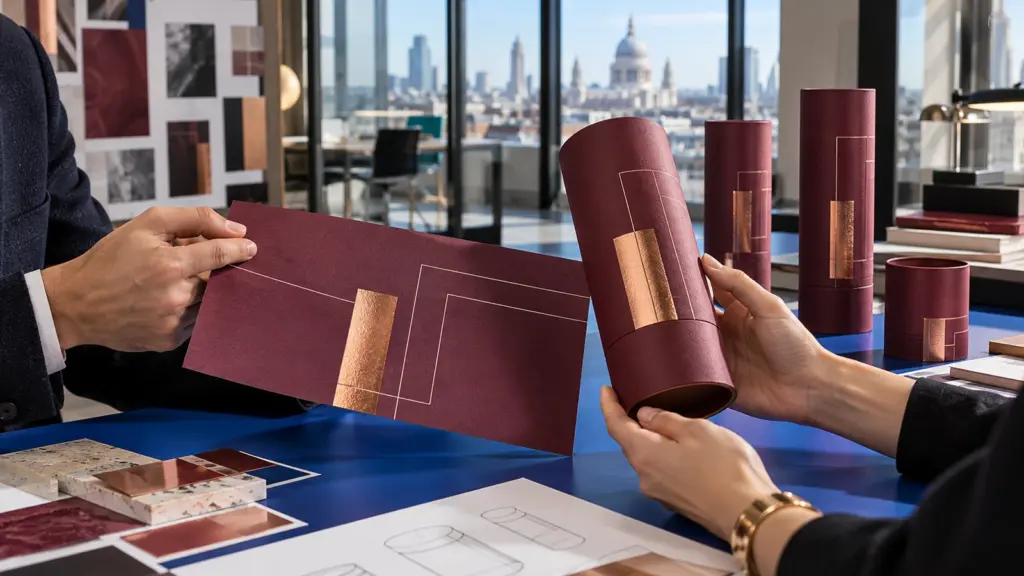
Hot stamping should normally be provided as a separate vector layer.
Zum Beispiel:
GOLD FOIL
Do not create a gold gradient in Photoshop and assume that it communicates metallic foil production.
Stattdessen, provide a clean vector shape showing exactly where the foil should be applied.
Prägung
Embossing raises the surface.
daher, provide a separate vector layer showing the exact embossed area.
A simple label could be:
EMBOSS
If foil and embossing must register together, make that clear in both the artwork and production instructions.
Prägung
Debossing creates a recessed surface.
Like embossing, it should be supplied as a separate, clearly labeled vector area.
Spot-UV
Spot-UV erzeugt einen glänzenden Kontrast in ausgewählten Bereichen.
daher, create a separate layer called:
SPOT UV
Do not merge the effect into the CMYK artwork.
Matte Laminierung
Full matte lamination normally applies across the entire printed surface.
daher, it usually does not need its own artwork layer.
Stattdessen, specify the film in the finishing requirements.
Glanzlaminierung
Gloss lamination follows the same principle.
Jedoch, if only one logo or pattern needs gloss, the process may actually be spot UV rather than full gloss lamination.
How to Prepare Custom Packaging Artwork Files
Before sending benutzerdefinierte Verpackungsgrafikdateien to the factory, go through the following workflow.
Schritt 1: Use the Final Approved Dieline
Never design final production artwork on an early structural drawing.
If the package dimensions change, request a new dieline.
Schritt 2: Keep the Dieline at Actual Size
Do not resize or stretch the dieline.
A production dieline should represent the actual package dimensions.
Schritt 3: Add Bleed
If background colors, photographs or illustrations reach the trim edge, extend them beyond the final trim line.
Illustrator supports document bleed and printer marks through its Marks & Bleed controls.
Many commercial projects use approximately 3 mm, but the packaging supplier’s specification should always take priority.
Schritt 4: Respect the Safe Area
Keep important elements away from trim and fold tolerances.
These elements include:
- Logo
- Barcode
- Produktname
- Zutaten
- Small text
Schritt 5: Prepare the Correct Print Color Mode
For process printing, prepare the file using the agreed CMYK workflow.
If Pantone colors are required, identify them separately.
Schritt 6: Check Fonts
Missing fonts can change text layout.
daher, either outline the fonts where appropriate or package the required font resources according to the agreed workflow.
Adobe Illustrator’s Package command can collect the Illustrator file together with linked graphics and eligible font resources for handoff.
Always keep an editable master version before converting text into outlines.
Schritt 7: Check Linked Images
One of the most common handoff problems is missing linked images.
Illustrator’s Links panel shows placed linked and embedded files, while the Package function can gather linked assets for transfer.
Before sending the project, check that every required image is included.
Schritt 8: Keep Logos Vector Where Possible
Vector logos produce cleaner results for:
- Heißprägen
- Prägung
- Scaling
Avoid extracting a small logo from a website screenshot.
Schritt 9: Separate Special Finishing Layers
A good file structure could be:
- DIELINE
- CMYK
- PANTONE
- GOLD FOIL
- EMBOSS
- DEBOSS
- SPOT UV
- WINDOW
This makes the intended manufacturing processes obvious.
Schritt 10: Check Overprint
Overprint settings can change how overlapping objects reproduce.
Illustrator includes dedicated overprint and color-separation controls, so these settings should be reviewed during prepress when relevant.
Schritt 11: Export a Print-Ready PDF
Along with the editable file, export a high-quality PDF reference.
Illustrator supports PDF creation for print workflows, including PDF/X-related options.
The supplier can use the PDF to compare the intended layout against the editable artwork.
Schritt 12: Include a 3D Mockup
A 3D rendering is not the technical production file.
Trotzdem, it is very useful because it shows:
- Front orientation
- Opening direction
- Logo-Position
- Expected finished appearance
Mit anderen Worten:
Artwork tells the factory how to produce it.
Mockups tell the factory how you expect it to look.
Providing both reduces ambiguity.
Packaging Artwork Preflight Checklist
Before sending your file, überprüfen:
- Correct dieline
- Correct packaging size
- Bleed included
- Safe zone checked
- CMYK workflow confirmed
- Pantone colors identified
- Fonts supplied correctly
- Linked images included
- Logos are vector
- Image quality checked
- Barcode checked
- Text proofread
- Foil layer separated
- Embossing layer separated
- Debossing layer separated
- Spot UV layer separated
- Window position confirmed
- Dieline kept separate
- PDF exported
- Mockup supplied
- Final internal approval completed
Acrobat Pro’s Preflight tools are specifically designed to analyze PDFs for print-production problems before output.
How Artwork Affects Sampling and Production Time
Poorly prepared benutzerdefinierte Verpackungsgrafikdateien can delay a packaging project before manufacturing even starts.
Zum Beispiel:
The supplier receives a JPG.
Then the editable artwork is requested.
Nächste, the AI file arrives but linked images are missing.
Danach, the correct images are supplied.
Jedoch, the dieline is outdated.
Once the dieline is corrected, the designer discovers that the foil layer has not been separated.
Another revision is required.
At this point, several days may have passed—even though no mass-production machine has started.
daher, good artwork preparation can directly improve the efficiency of the packaging development process.
Planning Your Packaging Lead Time?
Artwork approval is only one part of the overall project.
If you are also planning sampling, production and delivery, Lesen Sie unsere Custom Paper Tube Production Time: Complete Lead Time Guide.
That guide explains how:
- Artwork approval
- Probenahme
- Mindestbestellmenge
- Material availability
- Einlagen
- Spezielle Veredelung
- Multiple SKUs
can influence the complete production schedule.
Zusammen, these articles answer two important purchasing questions:
Is my artwork ready for printing?
Und
How long will production take after it is approved?
Common Artwork Mistakes
Sending Only a Screenshot
A screenshot may show the design direction, but it usually cannot provide the editable technical information required for production.
daher, supply editable artwork whenever possible.
Designing Before the Structure Is Final
If the dieline changes, artwork positions also change.
Folglich, finalize the packaging structure first.
Missing Linked Files
Check all linked photographs and graphics before sending the project.
Low-Resolution Logos
A logo copied from a website may look acceptable on a monitor but reproduce poorly in print.
Stattdessen, ask for the original vector version.
Using Too Many Unidentified Layers
Clear layer names reduce communication problems.
Zum Beispiel:
Layer 17 Copy 2
is much less useful than:
GOLD FOIL.
Merging Foil Into CMYK
The printer needs to know what should be printed and what should be foil stamped.
daher, keep those processes separate.
Ignoring the Tube Seam
Für zylindrische Verpackungen, avoid placing important branding on the spiral or vertical outer-wrap seam whenever the structure makes that area visually sensitive.
Designing on Hidden Areas
Some artwork can disappear beneath:
- Lid overlap
- Glue flaps
- Inner folds
- Ärmel
daher, check the assembled package before approving the design.
Einhaltung & Nachhaltigkeit
Packaging artwork can also contain regulatory or compliance information.
Depending on the product and market, this may include:
- Produktname
- Zutaten
- Net contents
- Warnings
- Manufacturer information
- Batch area
- Barcode
- Recycling information
The brand, importer or responsible party should confirm the exact regulatory requirements for the destination market.
FSC
If an FSC trademark is used, its use should comply with the applicable certification and trademark-approval requirements.
daher, do not simply download an FSC logo and place it on packaging without confirming authorization.
Lebensmittelkontakt
Food-contact safety depends on the approved packaging materials and full construction, not simply the exterior graphics.
Depending on the application, Käufer können eine Anfrage stellen:
- Food-contact reports
- Migrationsberichte
- Materialdeklarationen
- Ink information
- Adhesive information
BRC and IFS
BRCGS Packaging Materials and relevant IFS systems may support supplier-quality or food-packaging requirements.
Jedoch, certification references and logos should only be used appropriately.
EUDR and EPR
For applicable markets and supply chains, packaging buyers may also need to consider material due diligence and producer-responsibility requirements.
daher, regulatory review should happen before the final artwork is locked whenever these requirements affect printed information.
Sustainable Artwork Choices
Luxury packaging does not automatically require the maximum number of finishing processes.
Zum Beispiel, good typography combined with textured paper and one small foil logo may create a stronger premium effect than:
- Full lamination
- Large foil areas
- Several metallic colors
- Multiple UV coatings
daher, good design can sometimes reduce production complexity as well as material use.
So passen Sie es an
A smooth benutzerdefinierte Verpackungsgrafikdateien workflow starts before the designer opens Illustrator.
Schritt 1: Send Product Information
Provide:
- Produktname
- Product size
- Produktgewicht
- Fotos
- Physical sample if possible
Schritt 2: Choose the Packaging Structure
Select:
- Paper tube
- Rigid box
- Folding carton
- Drawer box
- Sleeve box
- Window packaging
- Telescopic packaging
Schritt 3: Confirm the Size
Approve final dimensions.
Do not finalize the artwork before this step.
Schritt 4: Choose the Material
Select:
- Kraftpapier
- Kunstdruckpapier
- Spezialpapier
- Food-grade material
- Folienliner
Schritt 5: Confirm the Insert
Zu den Optionen können gehören::
- No insert
- Pappe
- EVA
- EPE
- Geformter Zellstoff
- Plastic tray
Schritt 6: Confirm Printing
Wählen:
- CMYK
- Pantone
- Einfarbiger Druck
- Combination printing
Schritt 7: Select Finishing
Possible choices include:
- Heißprägen
- Prägung
- Prägung
- Spot-UV
- Matte Laminierung
- Glanzlaminierung
- Soft-Touch-Laminierung
- Kratzfeste Laminierung
Schritt 8: Request the Final Dieline
Once the structure and size are approved, request the final production dieline.
Schritt 9: Bereiten Sie das Kunstwerk vor
Supply:
- KI
- Bearbeitbares PDF
- EPS where appropriate
Also provide a PDF reference and, ideal, a 3D mockup.
Schritt 10: Confirm MOQ
Provide realistic quantities.
Zum Beispiel:
- 500 Stk
- 1,000 Stk
- 3,000 Stk
- 5,000 Stk
- 10,000 Stk
Schritt 11: Confirm Lead Time
Share the required:
- Launch date
- Factory completion date
- Liefertermin
- Destination
Schritt 12: Approve the Sample
Endlich, überprüfen:
- Größe
- Struktur
- Farbe
- Kunstwerk
- Folie
- Prägung
- Passgenau einsetzen
- Product positioning
Once these points are approved, mass production can proceed more efficiently.
Verwandte Produkte: Kundenspezifische Papierröhren / Lebensmittelverpackung / Kosmetikverpackungen
Warum Packverpackungen wählen??
Pack Packaging supports custom paper tubes and paper boxes from structural development through mass production.
Unsere Produktionsstätte umfasst 20,000㎡, darunter a 2,000㎡ Lebensmittelwerkstatt. Zusätzlich, monthly paper tube production capacity exceeds 10,000,000 Stücke.
Unser 20+ Mitglied des Designteams can assist with:
- Dieline development
- Produktanpassung
- Artwork checking
- Materialauswahl
- Insert design
- CMYK-Druck
- Pantone-Druck
- Heißprägen
- Prägung
- Spot-UV
- Probenahme
- Production preparation
When customers send benutzerdefinierte Verpackungsgrafikdateien, our team reviews the graphic layout together with the actual structure rather than treating the design as an isolated image.
Our OEM and ODM capabilities include:
- Sondergrößen
- Papierröhren
- Starre Boxen
- Faltschachteln
- Schubladenboxen
- Hüllenboxen
- Kraftpapier
- Kunstdruckpapier
- Spezialpapier
- Lebensmittelechte Materialien
- Cardboard inserts
- EVA-Einsätze
- EPE inserts
- Einsätze aus geformtem Zellstoff
- CMYK
- Pantone
- Heißprägen
- Prägung
- Prägung
- Spot-UV
- Matte Laminierung
- Glanzlaminierung
- Soft-Touch-Laminierung
- Kratzfeste Laminierung
- Strukturproben
- Printed samples
- Qualitätsprüfung
- Exportverpackung
Depending on the final materials, Produktanwendung und Zielmarkt, supporting documentation may include FSC-related documentation, Berichte über Lebensmittelkontakt, BRC-related information, IFS-related information, RoHS 2.0, REACH-SVHC and EPR support.
The exact documentation should always be confirmed against the final approved specification.
Häufig gestellte Fragen
1. What file format should I send for packaging printing?
Bearbeitbare KI, PDF or EPS files are commonly useful for packaging production. A PDF reference and 3D mockup can also make the intended finished appearance clearer.
2. Should packaging artwork be CMYK or RGB?
For standard process printing, artwork is typically prepared in a CMYK print workflow. Illustrator provides CMYK document mode and separation controls specifically for print output.
3. Do I need bleed?
If artwork reaches the trim edge, bleed is generally required. Illustrator supports defined bleed areas and bleed marks, while the exact amount should follow the packaging manufacturer’s specification.
4. Do fonts need to be outlined?
Fonts can be outlined where appropriate or supplied through an agreed packaged workflow. Always keep an editable master file because outlined text is no longer normal editable type.
5. Do foil, embossing and spot UV need separate layers?
Ja. Clearly separated vector layers make it much easier for the prepress and production teams to identify each special process.
6. Can I send a Canva, JPG or PNG file?
You can use them as references. Jedoch, the packaging supplier may still require editable production artwork containing dielines, vector logos and special-finishing information.
7. Why does the printed color look different from my monitor?
Screen display and physical printing use different output processes, while paper, Tinte, coatings and lighting can also influence the final appearance.
daher, physical approval is recommended when exact brand color matters.
8. Can you help check my artwork before printing?
Ja. The design and prepress team can review the artwork against the approved structure and identify potential production issues before sampling.
Entdecken Sie weitere maßgeschneiderte Verpackungslösungen
Auf der Suche nach weiteren Verpackungsmöglichkeiten? Entdecken Sie unser komplettes Sortiment an maßgeschneiderten Verpackungsprodukten für verschiedene Branchen und Anwendungen.
Faltschachteln – Leichte und vollständig anpassbare Kartons für Einzelhandelsverpackungen.
Starre Boxen – Hochwertige starre Geschenkboxen für Luxusmarken.
Wellpappkartons – Langlebige Versand- und E-Commerce-Verpackungslösungen.
Kindersichere Boxen – Sichere Verpackung für regulierte Produkte.
Zubehör – Benutzerdefinierte Einsätze, Seidenpapier, Bänder, Etiketten, und mehr.
Papierröhren – Entdecken Sie unsere spezielle Kollektion individueller Papiertubenverpackungen für Tee, Kaffee, Kosmetika, Kerzen, Spirituosen, und andere Premiumprodukte auf unserer spezialisierten Website.
Benötigen Sie eine individuelle Verpackung? Kontaktieren Sie noch heute unser Team für ein kostenloses Angebot und eine kompetente Beratung.